Digital class register for schools
A school day leaves many traces. Prilog keeps them together.
What was taught today? Which homework was set? Who was there, who was absent? And is everything recorded by the end of the week?
The class register accompanies teaching day after day. It helps teachers record information and gives the class teacher an overview of the school year.
With Prilog, your school can decide how it wants to work: with a digital class register, or by keeping the paper register with digital support for the absences that go on the school report.
A class register that fits your school’s everyday life
Every school has its own habits. At some, the class register stays in the classroom and is kept by hand. Others want to record lessons and attendance digitally.
Prilog supports different approaches. The school decides together how much of the class register it wants to use digitally.
-
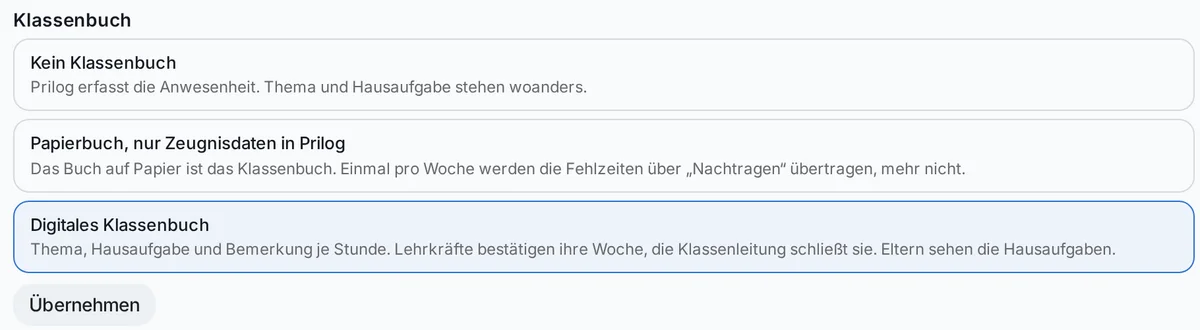
1. Record attendance
Prilog supports recording attendance. The school can keep its existing class register independently of this.
-
2. Paper class register with digital report data
The paper register remains the school’s class register. The absences needed for the school report are added in Prilog – for example once a week. This way the absence data is available digitally, while staff keep working with the familiar paper register in lessons.
-
3. The digital class register
Lesson topics, homework and attendance are recorded in Prilog. Teachers confirm their entries; the class teacher can review and close the week.
The chosen operating mode applies to the whole school. If you switch, data already recorded is kept.
For teachers
One lesson. One shared entry.
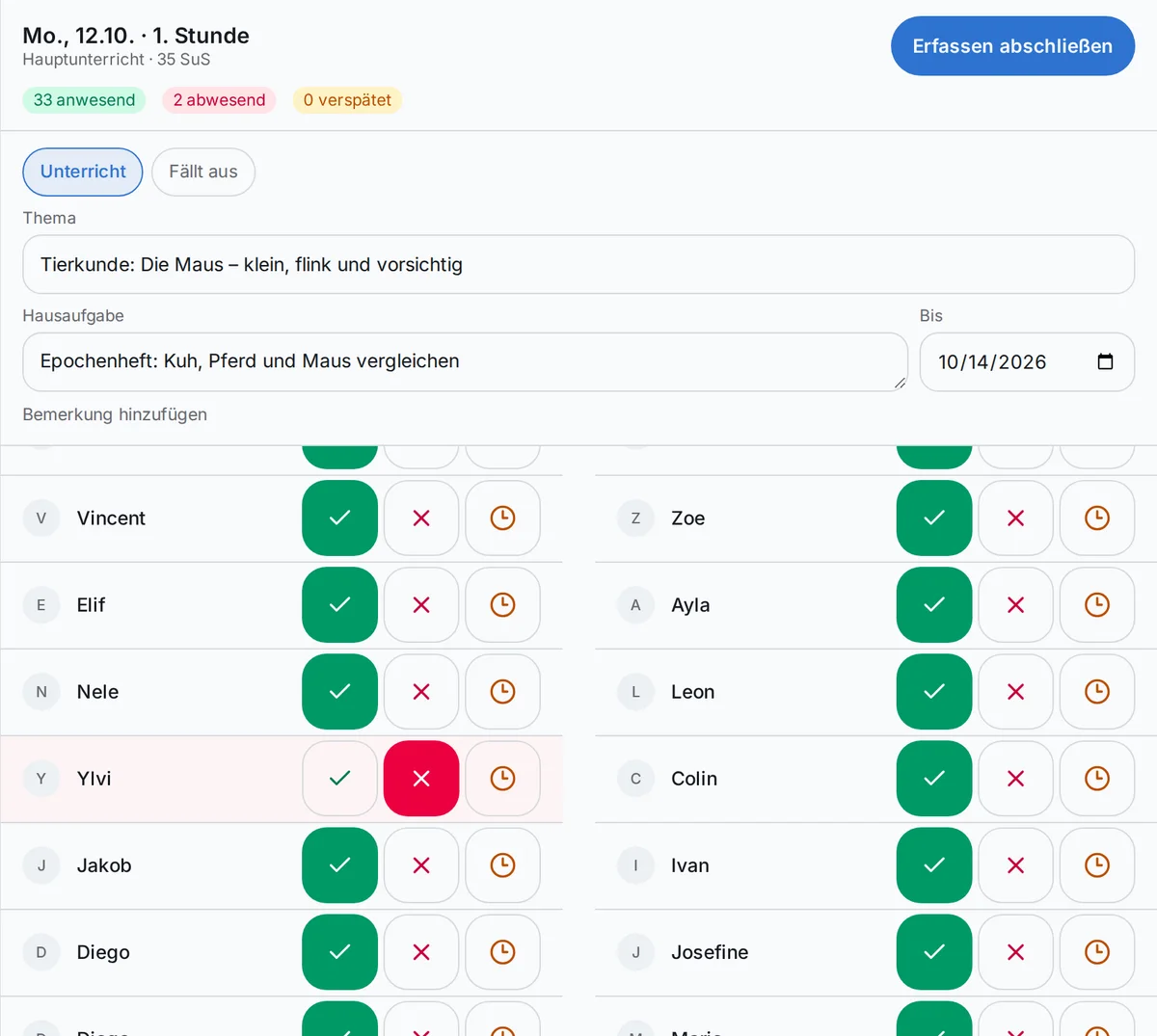
The lesson begins. You open it on your tablet, phone or computer. In front of you are the class and the details needed for this lesson.
You can record:
- which topic was covered in the lesson;
- which homework has been set and when it is due;
- which remark about the lesson belongs in the class register;
- who was present, who was absent and who arrived late.
Topic, homework and attendance are saved together. Prilog suggests continuing with the topic of the previous lesson.
If a lesson is cancelled, it can be marked as such. No attendance then needs to be recorded for that lesson.
The remarks field is meant for information about the lesson. Personal details about individual children, illnesses or descriptions of behaviour do not belong there – Prilog points this out right next to the field.
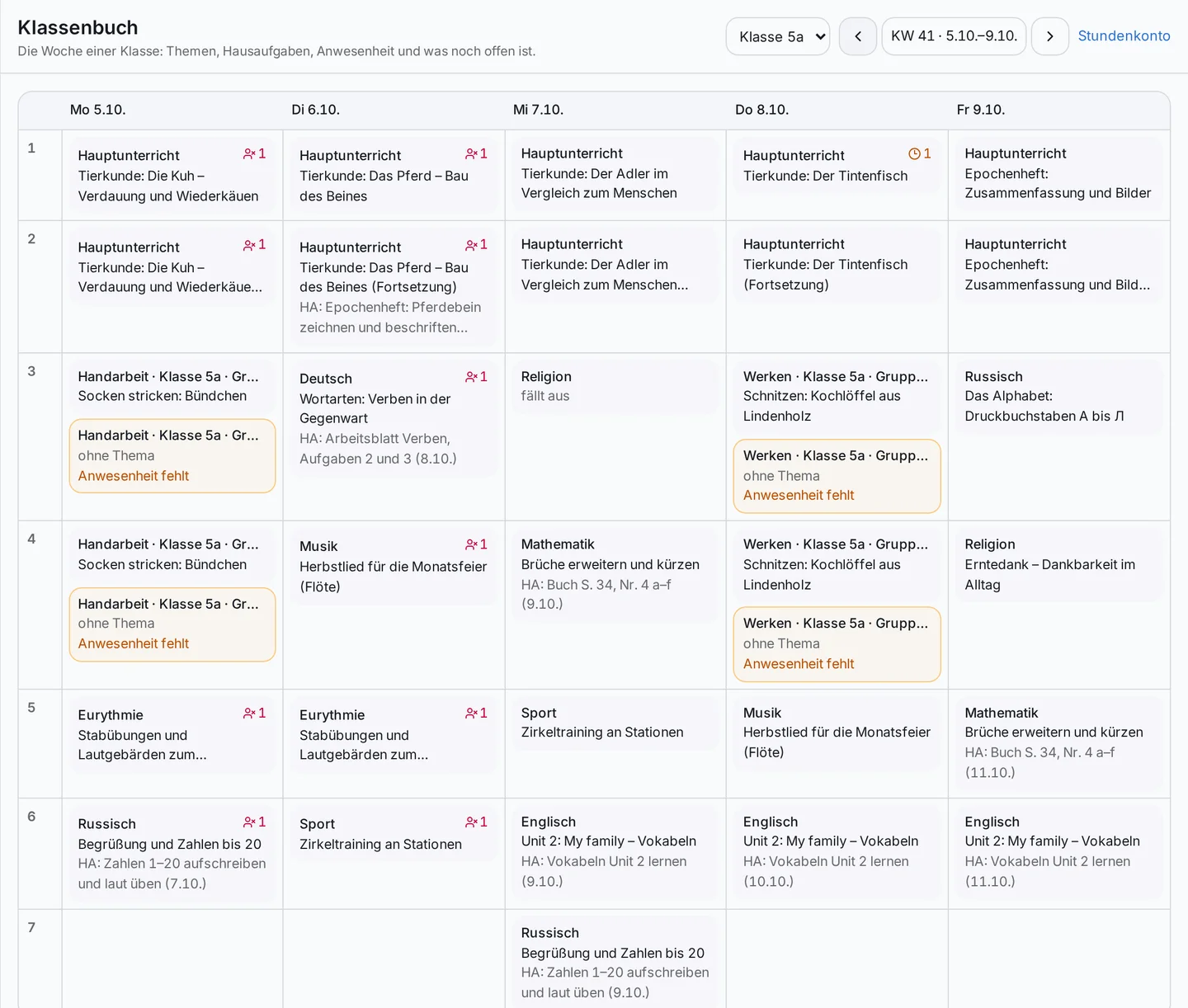
A week everyone can see at a glance
Over the course of a week, different teachers teach the same class. Each brings their own lessons and topics.
The weekly view brings these entries together: days, periods, lesson topics and homework can be seen in context. Missing details – such as attendance not yet recorded or a missing topic – are marked.
At the end of the week, teachers can review and confirm their own lessons. This gives the class teacher a basis for closing the week.
For class teachers: keeping track
See what is complete – and what still needs attention
The class teacher looks after a class across many subjects and lessons. The class register helps bring these entries together.
Before the week is closed, Prilog shows where details are still missing and which teachers have not yet confirmed their lessons. From Friday onwards, the class teacher can clear up open points or close the week and note what is still outstanding.
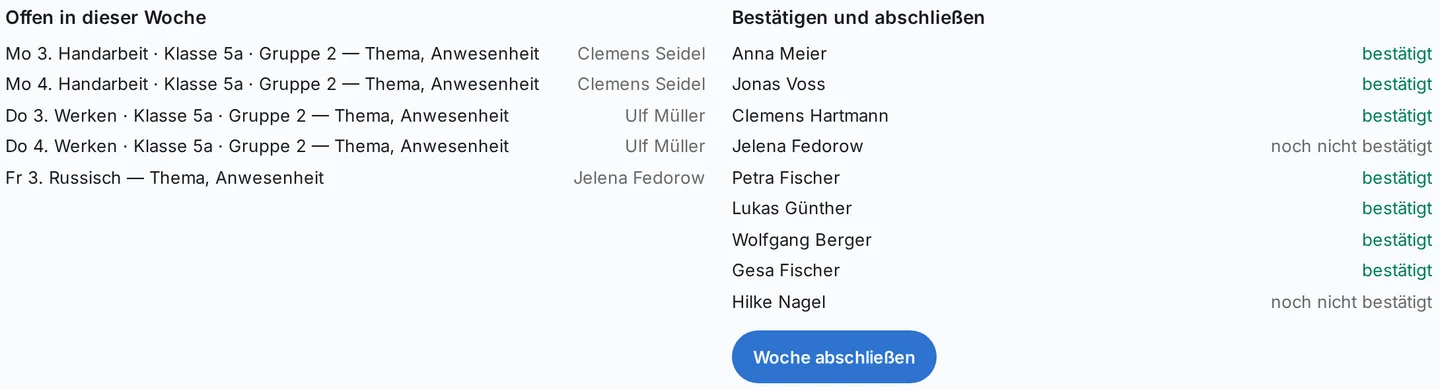
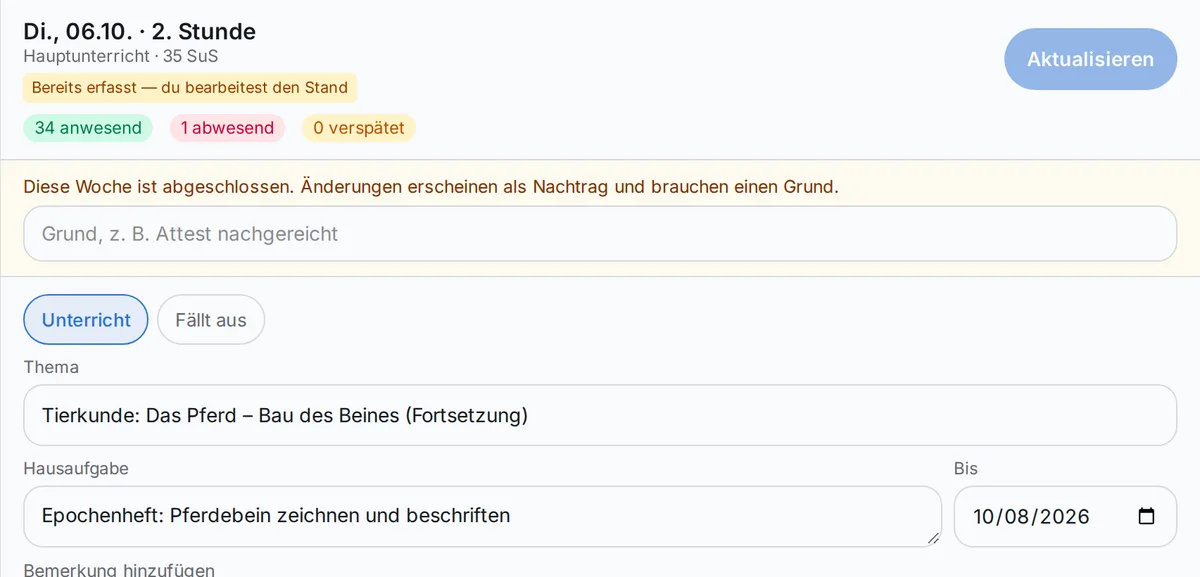
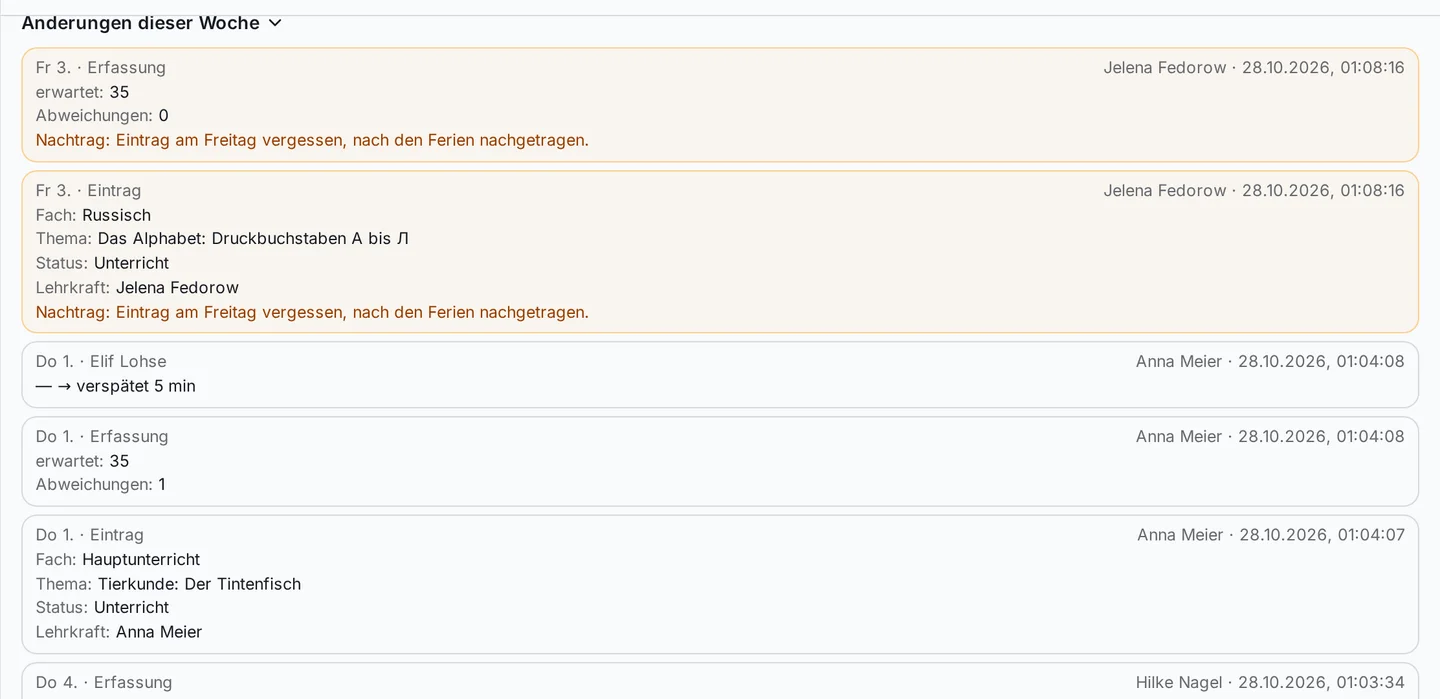
Once closed, the week receives a digital record of its state at that time. Later changes remain possible; they are recorded as late entries with a reason.
This means it can still be traced later how an entry came about and when it was changed.
Correcting mistakes – tracing changes
In everyday school life, an entry can be forgotten or attendance recorded incorrectly. What matters is that such mistakes can be corrected.
Prilog logs changes with the previous and the new state, as well as who made the change and when. After the week has been closed, a reason for the late entry is also recorded.
This gives the class teacher a clear, traceable overview. And teachers can correct entries, for example when a note of excuse arrives late or a slip is noticed.
What happens if the network goes down in the classroom?
Not every classroom has a reliable internet connection at all times. Prilog offers limited offline support for this.
If attendance cannot be sent when you save, it is first stored temporarily on the device and sent later, as soon as there is a connection again and Prilog is open.
There are important limits:
- Lesson topic and homework are not stored offline and have to be saved again later.
- If someone else has recorded the same lesson in the meantime, Prilog shows the conflict so you can decide.
- Entries that have not yet been sent are lost when you log out.
- Depending on the regulations of the federal state, temporary storage may be switched off.
For parents: homework and sick notes
If the school uses the digital class register, parents can see their child’s homework with its due date.
Sick notes can also be submitted through Prilog. Which details are requested depends on the settings and the jurisdiction.
What parents can see is limited to the information intended for them. Teachers’ remarks, information about other children and the change log are not part of this view.
For school leadership and administration
A shared view of the classes
School leaders and authorised people in the school office can get an overview of the classes: Which weeks are closed? Where are entries still open? Where is a close still pending? This helps the school keep track of the state of its records and clear up open questions early.
Closing the school year
At the end of the school year, a closed annual copy can be created: a PDF for reading and a file with the recorded data. Both are filed in the school’s document storage. This gives the school a fixed record of the school year that can be used for further retention.
Entries with clear responsibilities
Prilog distinguishes between the tasks of teachers, the class teacher, administration and data protection coordination. Closing the week, for example, is the class teacher’s task – school leaders and administration can also take it on; the deletion run is carried out by data protection coordination or administration.
Introducing a digital class register
With your school’s rules in mind
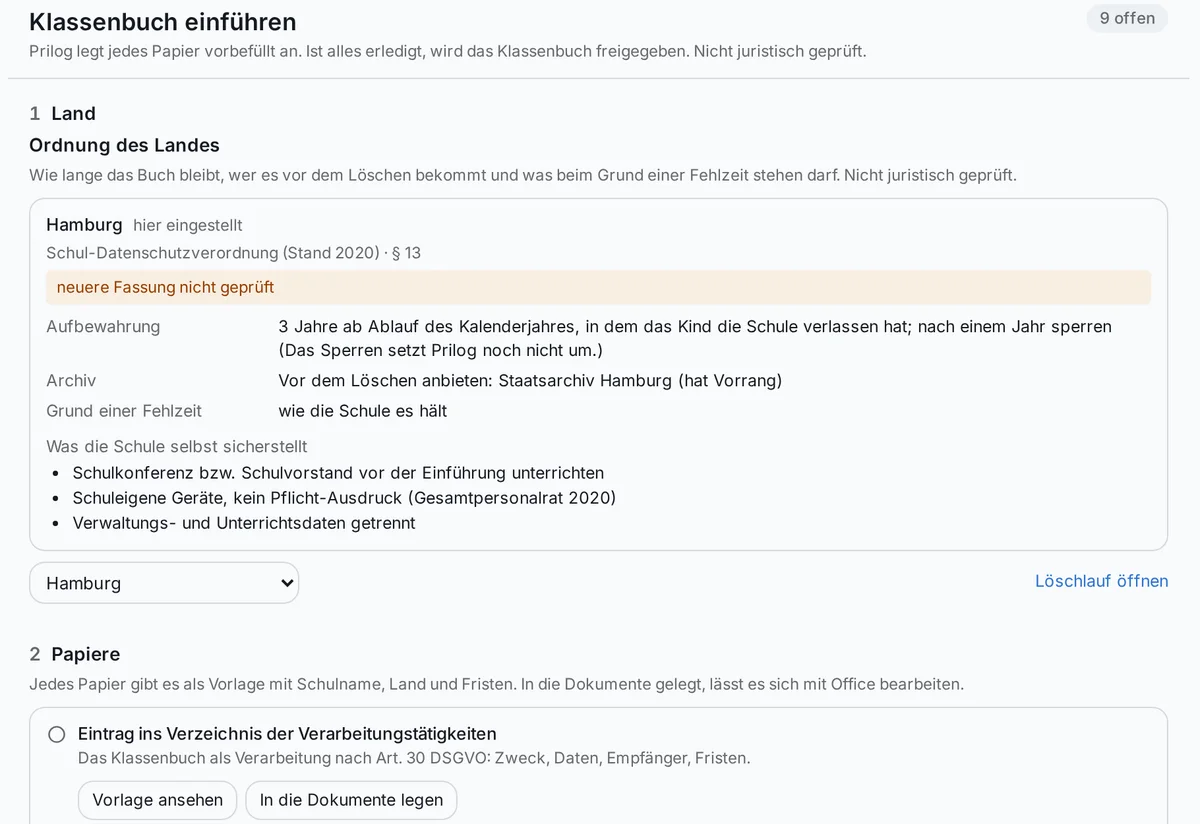
Introducing a digital class register is about more than operating a piece of software. Among other things, the school has to clarify which documents and consultations are required, who gets access and which rules apply to retention and deletion.
Prilog supports this process with an introduction workflow. The school first chooses its jurisdiction. Templates and review steps are then provided, for example for data protection documents, internal rules or informing parents.
The documents are prepared with the details already available and can be filed and edited further as Word files with the Office module. Before the digital class register is switched on, the school goes through the intended review and approval steps.
The templates have not been legally reviewed. They must be checked and completed for the individual school and – where necessary – agreed with the responsible bodies.
Data protection and retention
Keeping information for as long as it is needed
A class register contains personal data. That is why a school has to decide who may see which details, how long they are kept and when they can be deleted.
Among other things, Prilog offers:
- access rights that match the responsibilities of the people involved;
- a change log for entries;
- a weekly and an end-of-year close;
- an overview of class registers whose retention period has expired;
- an accompanied deletion run, with the option of holding back a register if needed.
A class register is not deleted automatically once the retention period has expired. The person responsible reviews the process and, where applicable, also takes into account any required offer to the responsible archive.
Retention periods and school law requirements differ. The information and templates stored in Prilog should be legally reviewed for the individual school before use.
Also for schools with special requirements
Switzerland and Austria
Alongside the German federal states, Prilog includes regulations for Austria and the canton of Bern. In the canton of Bern, absences are counted in half-days, and families can use joker half-days. For Austria, the procedure for breaches of compulsory schooling is included. The stored regulations serve as a working basis; whether they suit the particular school and its type of governing body must be checked before use.
Schools with courses and special programmes
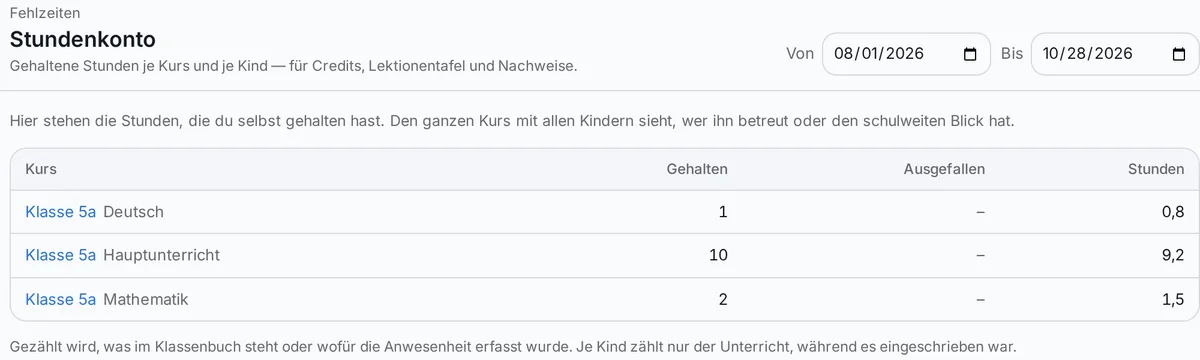
The lesson account shows how many lessons were held in a course and what attendance and absences look like for individual students. Even without the digital class register switched on, the lesson account works with the attendance data recorded.
Boarding schools
For boarding schools there are additional views for going out, returning and the evening roll call. They help staff on duty keep track of attendance in the residential area.
Frequently asked questions about the digital class register
Does our school have to switch completely to a digital class register?
Can lesson topics and homework be changed afterwards?
Can parents see the whole class register?
What happens if there is no internet connection?
What support is there for the introduction?
Is the class register deleted automatically once the retention period has expired?
Is the digital class register already available?
The class register in the manual (in German) → 16 federal states, 16 ideas of the class register →
How would you like to keep your class register?
Every school has its own processes, legal framework and experience with digital records. We are happy to show you how the class register in Prilog is structured, which operating modes there are and what would need to be considered when introducing it at your school.